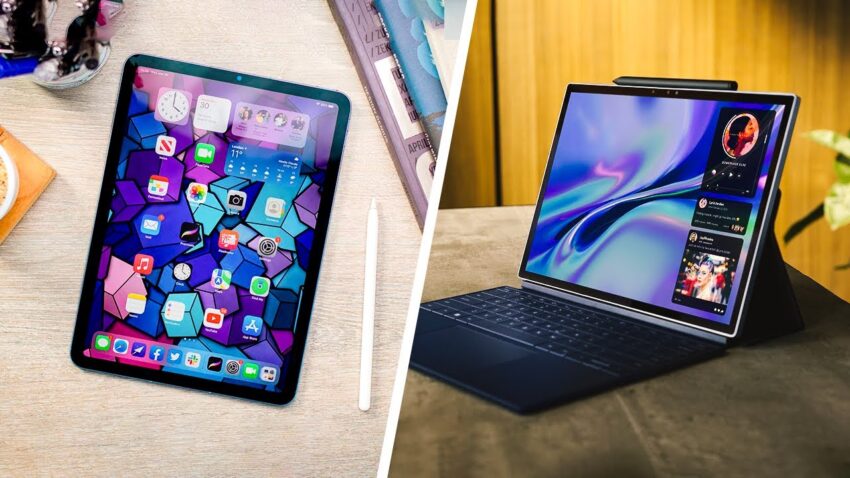
Introduction: The Evolving Role of Tablets in 2024-2026
Tablets have transcended their initial role as simple content consumption devices, evolving into indispensable tools for productivity, creativity, and education across 2024, 2025, and into 2026. This transformation is driven by significant advancements in hardware, software, and connectivity, blurring the lines between tablets and traditional laptops. The tablet market continues to experience substantial growth, with a global valuation of USD 84.6 billion in 2024, projected to reach USD 174.47 billion by 2032, demonstrating a Compound Annual Growth Rate (CAGR) of 9.47% from 2025 to 2032. This expansion is fueled by increasing demand for portability, continuous technological innovations, and their growing adoption in both educational and enterprise sectors.
Major players like Apple, Samsung, and Microsoft lead the charge, each offering unique ecosystems and features. Apple, with its iPad series, maintains a significant lead in the premium segment, accounting for approximately 40% of the global tablet market share in 2024. This dominance is attributed to its strong brand presence and seamless integration within its ecosystem. Samsung follows with a substantial share, offering a wide range of versatile Android-based tablets. As hybrid work and digital learning models become more prevalent, tablets are increasingly serving dual purposes as entertainment hubs and powerful productivity tools. The market is also seeing a trend towards premium displays, AI capabilities, and 5G integration, catering to the diverse needs of modern users.
Top Tablets for Students, Creators, and Professionals
The tablet landscape from 2024 to 2026 offers a remarkable array of devices, each designed with specific user needs in mind. We’ve meticulously evaluated the leading contenders to bring you our top recommendations.
Tailored Recommendations for Each User Group
Here are our top picks, categorized for their ideal users:
For Students: Students require versatility, durability, and a balance of performance and affordability for note-taking, research, and online learning.
- Apple iPad (11th Generation, 2025/2026): Often lauded as the best overall tablet for students, the latest entry-level iPad (11th Gen) with its A16 processor offers robust performance for everyday tasks, gaming, and creative work. It now starts with 128GB of storage, making it an even better value. It supports iPadOS 18 and will be upgradeable to iPadOS 26.
- Samsung Galaxy Tab S9 FE+: This tablet is an excellent choice for students who prefer Android’s flexibility, offering powerful hardware, a good display, and S Pen support at a competitive price point. It’s particularly recommended for note-taking and offers expandable storage.
- Lenovo Tab P12: For students who prioritize a large screen for reading and productivity without a premium price tag, the Lenovo Tab P12 is a compelling mid-range option.
For Creators: Creators demand powerful processors, vibrant displays, and precise stylus support for graphic design, video editing, and digital art.
- Apple iPad Pro (M5, 2025): Unquestionably the best premium iPad for creative professionals, the 13-inch iPad Pro (2024/2025) with its M4/M5 chip offers unmatched performance, a stunning Tandem OLED display, and exceptional Apple Pencil Pro support. It’s as powerful as high-end MacBooks, boasting improved thermal performance and rendering capabilities.
- Samsung Galaxy Tab S11 Ultra (2025): Representing the pinnacle of Android tablet productivity for creators, the Tab S11 Ultra features a massive 14.6-inch Super AMOLED 2x display, powerful MediaTek Dimensity 9400 Plus processor, and an included S Pen with Galaxy AI tools. Its large, vibrant screen and AI features are ideal for digital artists and media editors.
- Wacom Cintiq Pro 17 / Wacom Intuos Pro Medium (2025 model): While not traditional tablet PCs, these dedicated drawing tablets are crucial for professional artists and graphic designers. The Cintiq Pro 17 offers a professional-grade 120Hz UHD display for direct-on-screen drawing, while the Intuos Pro Medium provides exceptional pen precision and pressure sensitivity on a surface mimicking paper.
For Professionals: Professionals need devices that offer laptop-like performance, robust multitasking capabilities, and seamless integration with productivity software.
- Apple iPad Air (M4, 2026): Bridging the gap between a standard tablet and a laptop, the iPad Air (2026) with the M4 chip offers fast performance, a gorgeous Liquid Retina display, and is available in 11-inch and 13-inch models. It’s an excellent balance of power and portability for general professional use.
- Microsoft Surface Pro 10 (2025): The Surface Pro 10 (or Pro 9) is a top choice for professionals requiring a full Windows OS experience in a portable 2-in-1 form factor. It offers laptop-grade performance with Intel Core Ultra 7 or Snapdragon X Elite processors, long battery life, and stylus support, making it ideal for presentations and on-the-go work.
- OnePlus Pad 3: This Android tablet stands out for its great display, powerful performance, and superb battery life, making it a versatile option for professionals who need a capable Android device for productivity and entertainment.
- Honor MagicPad 4: Positioned as a best overall tablet by some, the Honor MagicPad 4 offers a slim, lightweight body, strong performance, and useful multitasking features, making it a strong contender for professionals seeking a premium Android experience.
Key Factors to Consider When Choosing Your Tablet
Selecting the right tablet involves weighing several critical factors to ensure it aligns with your specific needs.
- Performance: Consider the processor (e.g., Apple’s M-series chips, high-end Snapdragon, MediaTek Dimensity, Intel Core Ultra), RAM (8GB+ for heavy multitasking), and storage capacity. High-end processors and ample RAM ensure smooth operation for demanding applications like video editing or graphic design.
- Display Quality: Look for high-resolution screens (OLED, Super AMOLED, Liquid Retina XDR, Mini-LED) for vibrant colors, deep blacks, and excellent contrast. A high refresh rate (e.g., 120Hz) provides a smoother visual experience, crucial for creators and gamers.
- Battery Life: Most premium tablets offer 10-12 hours of use, with some budget options extending up to 14 hours. For students and mobile professionals, all-day battery life is paramount to avoid constant recharging.
- Operating System & Ecosystem: Your choice often comes down to iOS (iPadOS), Android, or Windows. iOS offers a highly optimized software and app ecosystem, Android provides more customization, and Windows tablets deliver a full desktop operating system experience.
- Accessories: Evaluate support for essential accessories like a stylus (e.g., Apple Pencil, S Pen) for note-taking and drawing, and a detachable keyboard for enhanced productivity and turning your tablet into a laptop alternative.
- Portability and Size: Tablets range from compact 8-inch models to large 14-inch-plus displays. Consider your primary use case: a smaller tablet for on-the-go reading, or a larger one for drawing and multitasking.
- Price and Value: Tablets span a wide price spectrum. Determine your budget and look for devices that offer the best features and performance within that range.
- Connectivity: Features like 5G readiness are increasingly important for staying connected in areas with unreliable Wi-Fi, especially for mobile professionals and students.
Frequently Asked Questions (FAQ)
Addressing Common Tablet Queries
- Which tablet is best for students in 2026? The Apple iPad (11th Generation, 2025/2026) is widely considered the best all-around tablet for students due to its powerful performance, versatile app support, and value. For Android users, the Samsung Galaxy Tab S9 FE+ is an excellent alternative.
- Are Android tablets good for students? Yes, absolutely. Android tablets like the Samsung Galaxy Tab S9 FE and Lenovo Tab P12 Pro provide excellent pen input, display quality, and performance for diverse student needs, often offering more flexibility and expandable storage options.
- What is the best budget tablet for students? For budget-conscious learners, the Amazon Fire HD 10 Plus or the Amazon Fire Max 11 offer reliable basic features and app support at an affordable price, ideal for reading and basic notes.
- Do students benefit from stylus support on tablets? Yes, stylus support is crucial for students, especially for note-taking, annotating PDFs, drawing diagrams, and in STEM or creative fields. It enhances learning efficiency and allows for a more natural interaction with digital content.
- Should I get a tablet or a laptop for school? This depends on your specific academic needs. Tablets offer unmatched portability and excellent touch/stylus interaction for note-taking and reading. However, for intensive writing, coding, or running desktop-specific software, a laptop or a 2-in-1 Windows tablet like the Microsoft Surface Pro 10 that can effectively replace a laptop might be more suitable. Many modern tablets, especially premium ones, can handle many laptop tasks with keyboard attachments.
Conclusion: Making an Informed Choice
The tablet market in 2024-2026 is rich with innovation, offering powerful and versatile devices for every user. Whether you are a student striving for academic excellence, a creator pushing artistic boundaries, or a professional demanding peak productivity, there’s a tablet designed to meet your needs. We’ve seen significant advancements in processing power, display technology, and accessory integration, making these devices more capable than ever before.
As we’ve explored, the “best” tablet isn’t a one-size-fits-all answer; it’s a personal decision based on your unique workflow, budget, and ecosystem preference. By considering key factors like performance, display quality, battery life, and accessory support, and by reviewing our tailored recommendations, you can confidently make an informed choice that will empower your digital journey for years to come.